sign in

How to Make $1,000 a Month Clipping Twitch Streams in 2026

We break down how Twitch clipping actually pays, the real math behind a $1,000/month, and where automated tools like klypra fit into the process.

How to make $1,000 a month clipping Twitch streams in 2026

No audience needed, no editing skills required, just knowing which moments to clip.

What is Twitch clipping, and how does it actually pay?

Clipping simply means turning a live Twitch stream, a YouTube video, or a podcast into short (30-60 second), often vertical, clips posted on TikTok, Reels, Shorts, or X.

The great thing about clipping: you don't need an existing audience, and you don't need editing experience to get started. Many successful clippers start out as viewers of a popular streamer, then become clippers themselves, repurposing that same content into short-form videos.

Today, various CPM-based payment models (cost per 1,000 verified views) pay clippers for their work. Some social media platforms, like TikTok, offer creators these payouts directly, and more and more clipping campaigns are being run by big influencers and brands on top of that.

Here's the concept: brands, streamers, and content creators post campaigns offering clippers money to generate viral clips. You look for highlights with viral potential, cut them together, and post them to TikTok, Reels, or Shorts. Campaign platforms like Vyro or Whop track the views and pay you based on verified views on your clips, not on how many followers you have.

Vyro, for example, pays $3 per 1,000 views, while the YouTube Partner Program pays only $0.50-$2 CPM. TikTok's Creator Rewards Program pays $0.40 to $1.00 per 1,000 qualified views.

Why do brands and streamers pay people to clip their streams?

Clips posted by real accounts and real people look and perform like organic content, so they get algorithmic reach. Paid ads don't get that same momentum, and brands aren't viewed as relatable. Many people posting about the same thing is literally like starting a trend, turning the algorithm in your favor.

For streamers specifically: clips on short-form social media platforms are today the biggest leverage streamers have. It doesn't matter whether it's a small, mid-sized, or world-famous streamer, almost every new-gen streamer has become famous through clips. That's why most streamers appreciate people clipping and spreading their content: it drives new viewers back to the live Twitch channel.

For brands specifically: when a lot of relatable people are spreading a brand's vision, it feels authentic, like a grassroots trend, not a paid ad on a billboard. That works heavily in favor of brands trying to build a community, a fanbase, and loyal customers.

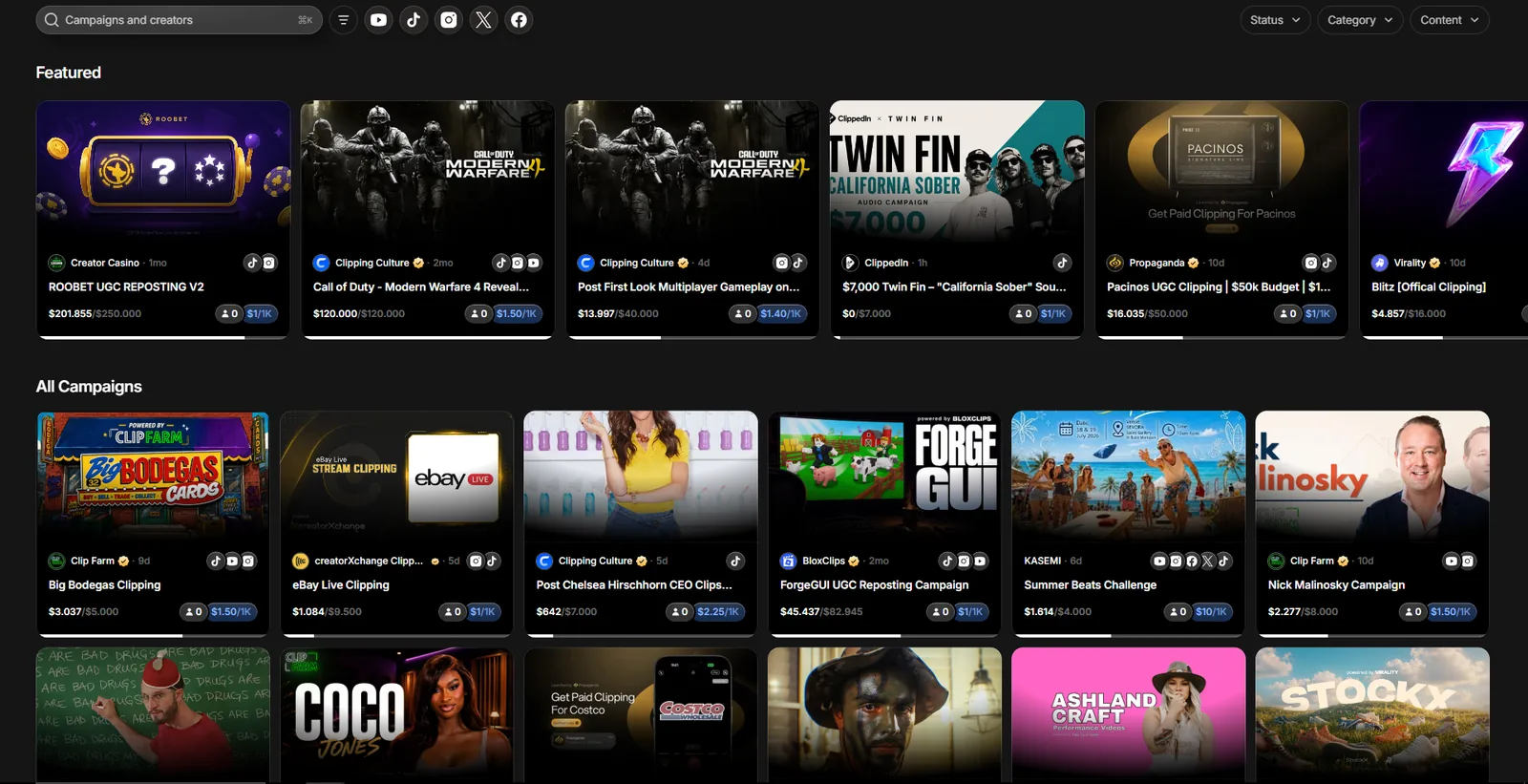
How much money is actually in campaign budgets?

It depends on the campaign. Some campaigns on contentrewards.com have budgets of up to a few hundred thousand dollars. Many position themselves between $10,000 and $50,000. Smaller campaigns run on budgets of up to $5,000.

Twitch and TikTok clipping campaigns listed on contentrewards.com

Campaigns listed on contentrewards.com.

How to detect viral clips from a Twitch stream

Most AI clipping tools like OpusClip, Vugola AI, Vizard AI, and more, simply put, score virality from video/audio: facial expressions, tone, pacing, what's being said. But moments worth clipping, the ones with the potential to go viral, aren't necessarily the ones that look impressive, like a great gaming moment.

Especially when clipping live streams, there's one really great way to identify viral clips: chat.

The chat consists of the same target group that also watches TikTok clips, Reels, and Shorts. If chat explodes, it shows that an outstanding moment just happened. A wave of caps-lock messages like OMG, NO WAY, HAHAHA, or emotes like omE are often used in correlation with a stream highlight. This is the best validation you can get for identifying viral clips before even posting.

This is also what klypra's highlight detection does: monitoring emote density and chat activity, and detecting highlights in real time that could become viral clips on TikTok, Reels, and Shorts.

Watching a live stream, following the content, and reading chat will dramatically increase your clip quality, content-wise.

The problem with auto podcast/video/VOD clipping tools

Many tools out there (OpusClip, Vizard AI, StreamLadder, etc.) are optimized for YouTube content, podcasts, or sometimes Twitch VODs. None of these approaches factor chat activity into their clip selection. On top of that, clippers using such tools will never be the first ones to post their clips. And nowadays, being fast with posting is one of the few levers left to increase your views. We compared several of these free tools in more detail here.

There are so many clip accounts trying to go viral with the same clips that, often, only the fastest clippers actually get most of the views.

Visualized: how klypra reads a chat spike and flags a highlight in real time.

Step by step: from live stream to your first viral clip

I managed to generate almost a million views with my first three clips, without putting in much effort.

TikTok view counts of 235.4K, 619.5K, and 46.8K on a brand new clipping account

A million views on a brand new TikTok account.

Here's how:

1. Find a viral niche

Start by looking for a viral niche that already offers proof of concept.

Then start warming up your accounts. That's the most important step, from my own experience. Before posting a single clip, you have to use your account like a viewer of the exact videos you're going to post. 20 minutes a day is enough, watch videos in its full length, drop a comment here and there, and like and save a few videos. Make sure you follow niche-relevant accounts, one by one. Repeat this for 3-4 days.

When posting on TikTok, your location actually matters too. Posting US content from outside the US is quite hard. However, there's an English-speaking audience in every country, so English content is a good compromise.

2. Find viral Twitch stream highlights and edit them

For a long time, this was the most complex part of the whole clipping process. I use klypra, which lets me monitor a channel, auto-detect highlights, edit them (reframe + subtitles), and even send them straight to my phone. A fully autonomous system that saves me a lot of time.

3. Post to TikTok, Reels, and Shorts

People debate whether this is a myth or not. From my experience, posting from a PC, especially on TikTok, has never worked well for me. I've always seen better results posting from my phone, which was also the device I used to warm up my account. Staying consistent with posting matters a lot: once you've freshly warmed up your account, you don't want to lose that effort by posting inconsistently. Also make sure to research peak posting hours for your target region/niche.

Don't start spamming out posts. Start with 1-2 posts a day and build momentum. Once the momentum is there, you can post more clips on a daily basis. But the most important thing is to stay consistent. So before posting a bunch of clips at once, make sure you'll be able to keep posting enough clips in the days that follow.

4. Monetize your clipping account

There are many ways to monetize. Right now, the loudest method is clipping campaigns, which can undoubtedly pay well. Vyro (by MrBeast), Whop, and a bunch of clipping Discord servers offer lucrative campaigns, but watch out for scammers, and better to trust big, established platforms.

That said, the original monetization methods still work well: TikTok's Creator Rewards Program or YouTube payouts. Affiliate and referral links can work too, but that heavily depends on your niche.

Best practices from my experience:

The $1,000/month math and where clips fail

Here's the math on how to really get to $1,000/month with clipping: at a $3 CPM, $1,000 a month needs roughly 333,000 views. At the more common $1 CPM some campaigns pay, that number jumps to 1,000,000 views. Either way, one viral clip won't get you there, consistent volume will.

What that actually looks like at each stage:

Here's the part most guides gloss over: minimum payout thresholds. Many campaigns only start paying once a clip crosses a certain view count, below that line, the clip earns you exactly $0, no matter how good it is. A clip stuck at 5,000 views might only bring in $5-15. One that breaks out to 200,000 views can bring in $200-1,000. The gap between those two numbers isn't luck, it's what you post, how fast, and how consistently.

That's why volume is the actual lever here, not chasing a single viral hit. The clippers hitting $1,000+/month aren't the ones who found one perfect clip, they're the ones posting every day, so more of their clips have a shot at clearing the threshold in the first place. Getting lucky with one viral hit is unlikely, the compounding effect of posting consistent will eventually get you there.

Manual editing vs. automated real-time clipping

Manual editingAutomated clipping
Amount of timeMultiple hours for a few good clipsStart monitoring and wait
Highlight detectionManual, search through hours-long VODsUses chat activity, proof the clip could become viral
Posting speedSlow, manual editing takes longPost only minutes after the moment happened on stream
CostYour timeklypra is free (other tools are paid)
ControlFull creative control over every cut, text, and timingWork with what the AI gives, generic but viral clip standard outcome
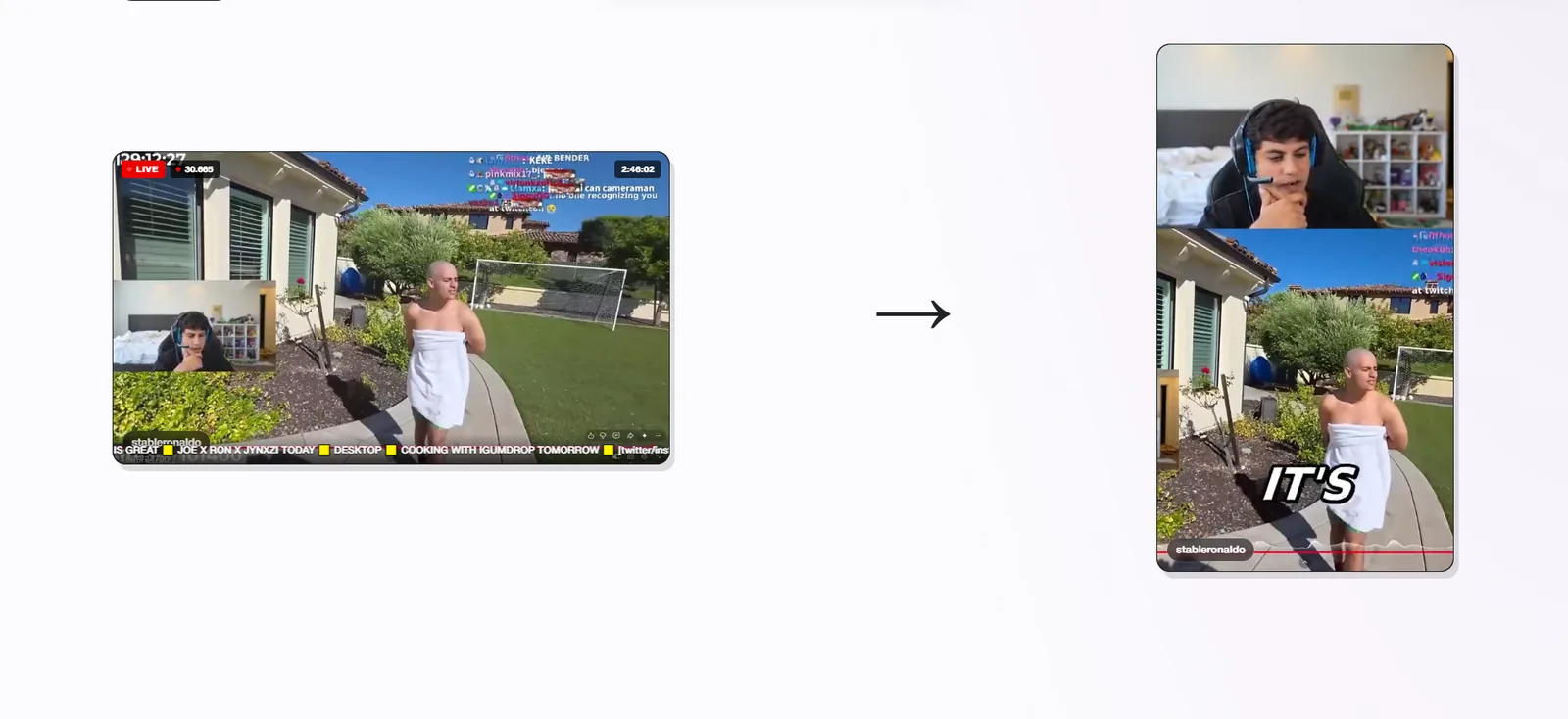
A Twitch stream reframed into a vertical, subtitled clip by klypra

How klypra treats a Twitch stream and turns it into a viral clip.

Common mistakes that keep clippers stuck at $0

Most people who fail at clipping don't fail because the model doesn't work. They fail because of a handful of avoidable habits.

Mistake 1: Posting inconsistently. A bunch of clips one day and then nothing for a week resets your momentum every single time. Platforms reward accounts that post daily, not accounts that post in spurts.

Mistake 2: Ignoring platform differences. The same clip, posted identically everywhere, rarely performs the same on TikTok, Reels, and Shorts. Formatting, captions, and even posting times need to be adjusted per platform, not copy-pasted.

Mistake 3: Not tracking what actually works. Without a feedback loop, which moments, formats, or hashtags perform best, you're just guessing on every new clip. A few minutes reviewing your own numbers each week beats hours of blind posting.

Mistake 4: Quitting too early. Clipping compounds: your older clips keep collecting views while new ones go up (never delete clips). Most people quit after a rough first week, right before that compounding effect starts to show. Give it at least 30 days before judging whether it's working.

FAQ

Do I need my own Twitch channel to make money clipping Twitch streams?

No. Clipping works off other people's Twitch channels, you don't need to stream yourself, build a following, or hit Affiliate/Partner status to get paid.

How many views do I need to make money clipping streamers?

It depends on the CPM, but a rough benchmark is $1,000/month needing 333,000-1,000,000 views total, spread across your clips. Individual clips under a platform's minimum payout threshold can earn $0, which is why volume and consistency matter more than any single clip.

Which platform pays the most for clipping Twitch streams?

Campaign-based platforms like Vyro (up to $3 CPM) typically pay more than standard creator programs like the YouTube Partner Program ($0.50-$2 CPM) or TikTok's Creator Rewards Program ($0.40-$1.00 CPM). Rates change often, so it's worth comparing current campaigns before committing to one.

Can I clip any Twitch streamer, or only specific campaigns?

You can clip any public stream for organic growth, but paid campaigns (via Vyro, Whop, or similar platforms) usually specify which streamers or content you're allowed to clip and get paid for.

How long should a Twitch clip be for TikTok, Reels, or Shorts?

30-60 seconds is the sweet spot, long enough to deliver a full moment, short enough to hold attention on short-form platforms.

next up best free Eklipse alternatives for Twitch clippers →

start getting post-ready viral clips.

continue with twitch