Free ViddyFlow Alternatives (2026): Free and Paid Compared
 Founder, klypra – @henri_tmp
August 9, 2026 · Updated
We compare ViddyFlow with the six tools clippers actually switch to, on price, free plan, source material and watermark.
Founder, klypra – @henri_tmpWe compare ViddyFlow with the six tools clippers actually switch to, on price, free plan, source material and watermark.
ViddyFlow vs. the alternatives, and where each one actually fits.
ViddyFlow gives you 500 free credits when you sign up, no card required. After that, you're paying $5 per 1,000 credits, with no ongoing free plan. If you clip often, that adds up fast.
The best alternative depends on what you are replacing ViddyFlow for. ViddyFlow is genuinely good at VOD analysis, so the right switch is the one that fixes the specific thing you miss:
ViddyFlow is freemium, not free. You get 500 credits on signup with no credit card required, which is enough to process a stream or two and see how the AI performs. Once those run out, you buy credit packs: $5 for 1,000, $20 for 4,500, or $50 for 12,500.
There's no monthly free tier that resets, it's pay-as-you-go. That's exactly why "free ViddyFlow alternative" is such a common search: the free credits are for testing, not for a real, ongoing clipping workflow. Clips made with them also carry ViddyFlow branding, which comes off the moment you buy any pack.
ViddyFlow's strength is multi-signal analysis. It doesn't just read your transcript, it combines video scene analysis, full Twitch chat replay, and transcript/sentiment scoring into one highlight score. That's a smarter approach than tools that only look at what was said.
It also handles the busywork after highlight detection: AI-generated YouTube titles, descriptions, and chapter markers, plus up to 10 vertical shorts (15-60 seconds each) alongside a full highlight reel. You can pick between balanced, audience, or streamer-weighted processing modes depending on what you want it to prioritize.
For streamers who don't mind a manual step after each stream, it's a solid, purpose-built tool.
ViddyFlow falls short on timing. It works from VODs: the stream ends, the VOD link gets copied and pasted in, then you wait for processing. There's no live monitoring, so clips only exist after the stream is already over. We go deeper on why that gap matters across the whole market in real-time vs VOD-based clip generators.
That matters more than it sounds. If you're relying on clips to grow an audience, being first to post a moment is a real advantage, other clippers are racing to the same highlight. A tool that only starts working once the stream has ended is always a step behind one that's watching live.
Combine that with the credit-based pricing, no permanent free plan, and credits burn faster the more you clip, and ViddyFlow starts to look better suited to occasional use than a daily workflow.
Most comparisons rank tools on the same feature grid. Two things decide whether a VOD tool works for you at all, and neither shows up on a pricing page:
klypra doesn't wait for your VOD. It monitors your Twitch chat and stream while you're live, so clips are usually ready within a few minutes of the moment happening, not after you've ended stream and uploaded anything. That speed matters: you're often one of the first to post the highlight, before anyone clipping manually catches up.
With mobile delivery turned on, clips land straight in your Telegram chat. From there you can still fine-tune things after the fact, turning on facecam detection or adjusting reframing right in the chat, without opening an editor. It's the closest thing to "ViddyFlow, but live and free to start."
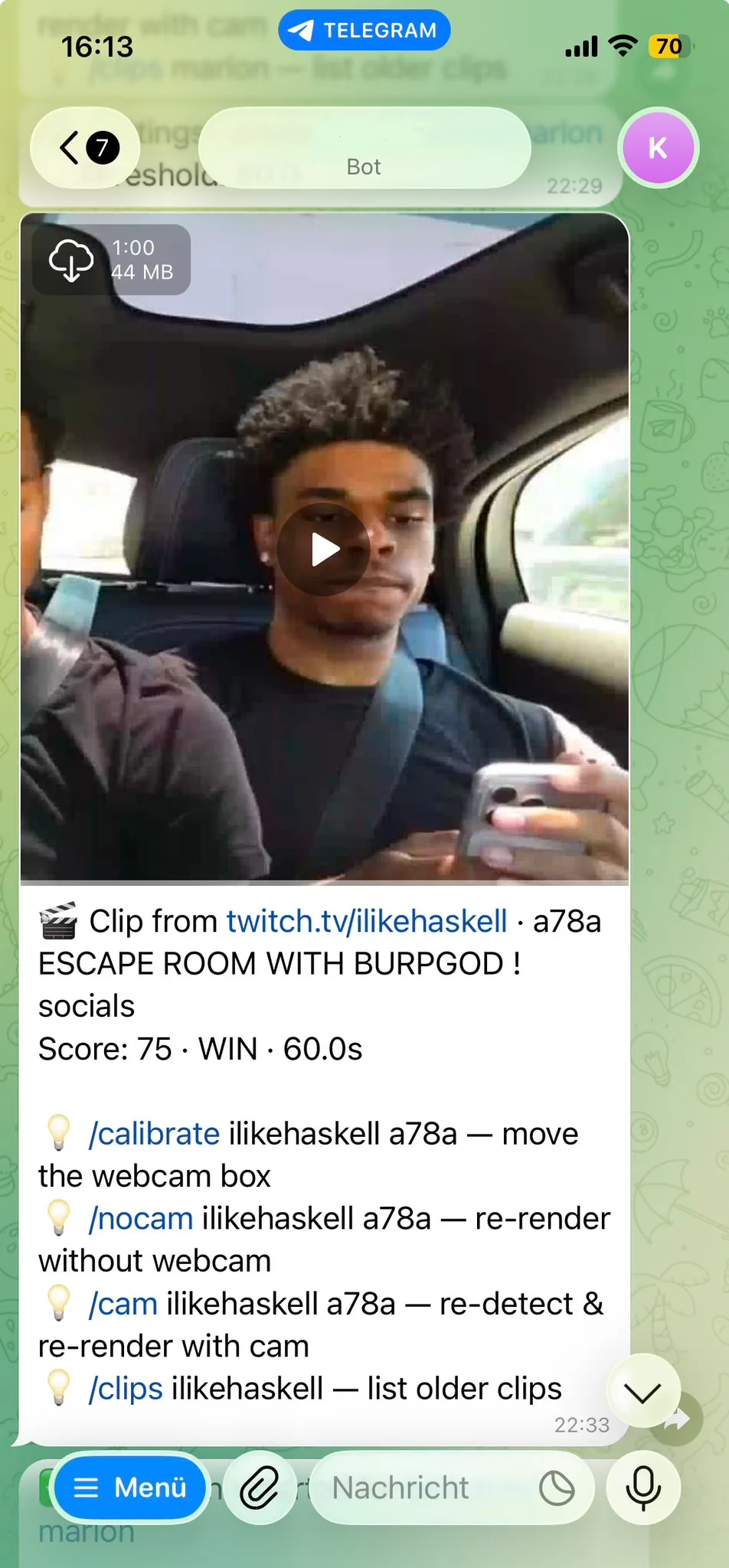
A clip landing in Telegram minutes after the moment happens, ready for facecam reframing before you post it.
Eklipse lets you test AI clipping without paying, but the free plan is limited: just a handful of lifetime credits, a visible watermark on exports, capped at 720p, and only one stream processed at a time. Fine for trying the concept, not for a regular posting schedule. We cover more free options beyond ViddyFlow in free Eklipse alternatives.
Unlike most "free" tiers, StreamLadder's basic plan is actually free and unlimited, and it doesn't add a watermark to basic exports. The tradeoffs: exports are capped at 720p/60fps, and rendering is slower than on paid plans.
Medal is completely free for its core features, with no watermark and a built-in gaming community to share clips in. The limitation is scope: no YouTube publishing, no SEO features, and no live-stream monitoring, it only records locally while you play, so clips stay on your device until you move them yourself.
Four alternatives have a free plan with no end date: klypra, StreamLadder, Medal.tv and Cross Clip. Paid entry ranges from $4.99 a month (Cross Clip) to $24.99 a month (Eklipse). Here is the full comparison:
| Tool | Entry price | What you get for free | Source material | Watermark on free |
|---|---|---|---|---|
| ViddyFlow | $5 per 1,000 credits, up to $50 for 12,500 | 500 credits on signup, no card, one time only | Finished Twitch VOD | Yes, gone once you buy any credit pack |
| klypra | No paid plan yet | 4 h monitoring/day, 5 clips/day, 50/month, 1 channel, 1080p | Live Twitch stream, in real time | Yes |
| Eklipse | $24.99/mo, or $179.99/yr | Previews of one recent stream, no export | Finished Twitch, YouTube or Kick VOD | No free export at all |
| StreamLadder | From about $8/mo, $27/mo for AI clipping | Unlimited manual edits, 720p | An existing Twitch clip you paste in | Only on premium-tier effects |
| Medal.tv | $6.99/mo ad-free, $9.99/mo Premium | Unlimited clips, 20 min max, 1080p | Local PC gameplay capture | Yes, on downloads |
| Cross Clip | $4.99/mo, or $49.99/yr | Unlimited conversions, 720p | An existing Twitch clip you paste in | Yes |
| Powder | Pro tier by sales enquiry | All features, Windows desktop app only | Own PC recording or finished VOD | Not published |
Pricing reflects publicly listed plans as of September 2026, always check each tool's current pricing page before committing. The column that matters most is source material: ViddyFlow, Eklipse and Powder need the stream to be over, StreamLadder and Cross Clip need you to have caught the clip yourself, and Medal.tv records your own PC rather than anyone else's stream.
If you're weighing this against turning clipping into actual income rather than just picking a tool, see how to make $1,000 a month clipping Twitch streams.
ViddyFlow is freemium. You get 500 free credits on signup with no card required, then pay $5 per 1,000 credits, up to $50 for 12,500. There's no recurring free plan that resets, and output from those signup credits carries ViddyFlow branding until you buy a pack.
Only VODs. You paste in a VOD link after the stream ends and wait for processing. There is no live monitoring during the stream.
A tool that monitors a stream live, like klypra, gets clips out within minutes of the moment happening, instead of waiting until after the stream ends and a VOD gets uploaded.
No. A VOD-based tool needs the VOD to exist. Twitch keeps past broadcasts for 7 days on regular accounts, 14 days for Affiliates and 60 days for Partners, Turbo and Prime users, and streamers can switch VOD storage off entirely. A live tool like klypra never needs the VOD, because it clips while the stream is running.
It depends on the tool. klypra watermarks its free clips, Medal.tv and Cross Clip watermark their free downloads, and Eklipse has no free export to watermark in the first place. StreamLadder is the exception: its basic free editing comes out clean, and only premium-tier effects add a mark.
ViddyFlow is a capable tool, but its VOD-only workflow and credit-based pricing mean you're always working after the fact, and paying per clip once your free credits run out. If speed and cost matter more than deep multi-signal analysis, klypra gets you live clips in minutes, delivered straight to your phone, free to start. The 5-minute setup guide walks through connecting your first channel. ViddyFlow isn't the only credit-based tool with this gap, see free Vugola AI alternatives for another one.