Vugola AI doesn't have a free plan, just a $1, 3-day trial that needs a card up front. We compare three real free alternatives, including the one built for live Twitch clipping.

Vugola AI vs. three free alternatives, no trial, no card required.
Vugola AI doesn't have a free plan. What it has is a $1, 3-day trial that requires a credit card up front, and after that you're on a paid plan starting at $14/month. If you searched for a free way to get Vugola's AI clipping without eventually paying for it, this article is for you, and if you're clipping a Twitch stream, klypra is the closest real match, because it's completely free right now with no trial and no card required.
We'll walk through three real alternatives below, what each one is actually built for, and why the "free" question gets more complicated the moment you're clipping a live Twitch stream instead of a finished recording.
Vugola AI markets itself as an all-in-one clipping, captioning, and scheduling tool for podcasters and long-form creators. You upload a recorded video, a podcast, an interview, a webinar, and its AI finds the moments worth turning into short clips, then schedules them across TikTok, Instagram, X, LinkedIn, Threads, and Bluesky.
That positioning is also why there's no free tier. Vugola's pricing runs Starter at $14/month, Creator at $29/month, and Agency at $99/month, with only the $1, 3-day trial as an entry point, and a card is required before you even start it.
There's a second, more specific limitation worth knowing before you compare alternatives: Vugola doesn't monitor live streams. By its own admission, if a stream is on Twitch and you want clips pulled from the live feed in real time, that's not what it does, you'd need to wait until the stream ends and upload the finished VOD instead.
Before picking a tool, it helps to separate two different jobs that get lumped together under "AI clipping":
Live monitoring vs. VOD upload. Some tools watch a stream as it happens and flag moments in real time. Others only work once you upload a finished recording.
A real free plan vs. a trial. A trial converts to a paid plan automatically or locks you out after a few days. A free plan just keeps working.
Mobile delivery. Do clips land somewhere you can act on them immediately, or do you have to log back into a dashboard to find them?
Watermarks. Free tiers often quietly add one.
Keep those four in mind, they're what actually separates the alternatives below.
klypra monitors a Twitch stream while a streamer is live, watching chat activity to catch highlights as they happen instead of waiting for the stream to end. Because detection runs in real time, clips are typically ready within minutes of a highlight happening, which matters if you want to be one of the first people posting about a moment, not the fifth.
Clips can be delivered straight to your phone via Telegram, and once mobile delivery is on, you can keep adjusting settings from inside the chat itself, including facecam detection and reframing, without opening a dashboard.
And on the "free" question specifically: klypra is completely free to use right now. There's no trial period, no credit card required to start, and no paid tier active at the moment. A Pro plan is planned for later, but until it launches, everything is available at no cost, and when Pro does launch, klypra is giving away a free month of it to randomly selected people on its waitlist.

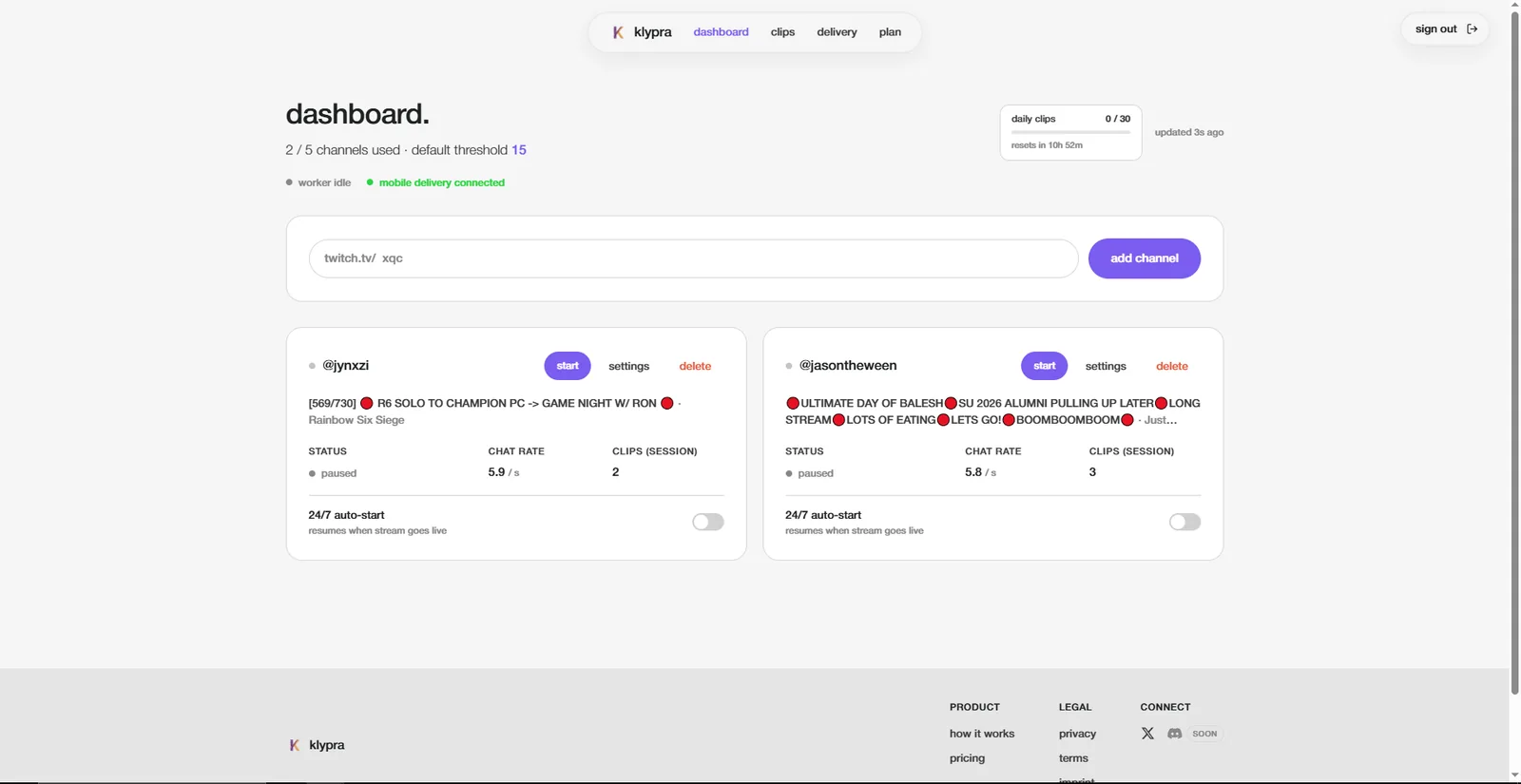
klypra's dashboard: live monitoring, auto-detected highlights, and clips delivered straight to Telegram.
How klypra's live detection works
Instead of scanning a finished recording after the fact, klypra watches the stream's chat activity as it happens. When it spots a spike that looks like a highlight, it starts clipping, so the moment is already processed by the time the stream ends, not hours later.
Opus Clip is one of the few tools in this space with a genuinely free-forever plan: 60 credits per month and renders up to 1080p. Two things to know before you rely on it. The free plan watermarks its animated caption templates, and rendered clips are deleted after three days, so you have to download them promptly. For podcasters and YouTube creators, it's still a solid way to test AI clipping without paying anything.
The catch is the same one Vugola has: Opus Clip works from uploaded or recorded video, not a live Twitch feed. Its clip detection (branded as ClipAnything) is strong for dialogue-heavy, long-form content, but it has no concept of "live," there's nothing to monitor in real time.
If you're leaving Vugola because you specifically edit podcasts or interviews rather than clipping a live stream, Opus Clip's free tier is a reasonable landing spot. If you're clipping Twitch, it solves a different problem than the one you actually have.
StreamLadder is Twitch-native, which already puts it closer to the mark than Vugola or Opus Clip. Its free plan includes a clip editor and a clip downloader with no watermark on basic editing.
But the AI part, ClipGPT, which auto-detects highlights, isn't on the free plan. It sits behind StreamLadder's paid Gold tier, priced roughly $8-11/month, with a 7-day trial if you want to test it first. And like the other two tools here, ClipGPT analyzes the VOD after the stream ends. It doesn't watch the stream live.
So StreamLadder is a genuinely useful free tool if you're happy to scrub through Twitch VODs and cut clips manually, it's just not an automated, live alternative to Vugola in the way klypra is.
Here's the pattern across every alternative on this list except one: Vugola waits for a recording to be uploaded. StreamLadder's AI detection waits for the stream to end. Opus Clip only ever sees a finished file. All three are VOD-based tools wearing different branding. We break this pattern down across the wider market in real-time vs VOD-based clip generators.
That gap matters more than it sounds. A clip that's ready the moment a stream ends, or, with klypra, while it's still live, can go out while the moment is still trending. A clip that's ready three hours later, after a VOD has been manually uploaded and processed, is competing with everyone else's clips of the same moment, posted while that upload was still running.
klypra is the only tool in this comparison that actually watches the stream as it happens instead of picking through the wreckage afterward.
The live-vs-VOD gap in plain terms.
| Tool | Price | What you get for free | Live Twitch support | Mobile delivery |
|---|---|---|---|---|
| klypra | No paid plan yet | 5 clips/day, 50/month, 1 channel, 1080p | Yes, monitors the live stream | Yes, Telegram |
| Vugola AI | $14/mo Starter, $10/mo billed annually | Nothing, the 3-day trial costs $1 and needs a card | No, upload only | No |
| Eklipse | $24.99/mo, or $179.99/yr | Previews of one recent stream, no export | No, scans the VOD after the stream | No |
| Opus Clip | $15/mo Starter, $29/mo Pro | Local uploads and YouTube links, clips expire after 3 days | No, and Twitch import is paid-only | No |
| StreamLadder | From about $8/mo, $27/mo for AI clipping | Unlimited manual edits, 720p | No, you paste in a finished clip | No |
| Cross Clip | $4.99/mo, or $49.99/yr | Unlimited conversions, 720p | No, you paste in a finished clip | No |
If you'd like to see how other free tools stack up beyond this list, see free ViddyFlow alternatives for another credit-based tool with the same VOD-only limitation.
Yes, $1 for 3 days, with a credit card required up front. After the trial, plans start at $14/month.
Yes. There's no trial and no credit card required right now. A Pro plan is planned, but everything is free until it launches.
No. Vugola works from uploaded or pre-recorded video only, it doesn't monitor a live stream in real time.
klypra, if you want live, automated detection. StreamLadder's basic editor is also free, but you'll be finding and cutting clips manually from the VOD.
If Vugola's trial is about to charge a card, the fix depends on what's actually being clipped. Editing podcasts or interviews that are already uploaded? Opus Clip's free tier covers that. Clipping Twitch VODs by hand? StreamLadder's free editor works. But if it's a live stream and the goal is clips without paying anything or watching the clock on a trial, klypra is built specifically for that, and it's free to join right now, with a free month of Pro going out to a few random people on the waitlist once that plan launches. If you're also weighing which niche or platform actually pays for that effort, see which clipping niche pays the most.