sign in

quso.ai Alternative for Twitch Clippers (Free)

quso.ai wasn't built for live Twitch clipping, it was built for podcasters and coaches turning Zoom calls into LinkedIn clips. We break down what that means if you clip Twitch streams for a living.

quso.ai vs klypra: comparing VOD-based and live Twitch clipping

quso.ai vs klypra: two tools built for two very different clocks.

Does quso.ai work for live Twitch clipping?

No, not really. quso.ai's own help docs list its inputs as "podcasts, webinars, and YouTube videos." There's a Twitch-branded landing page (/tools/ai-twitch-clip-generator) that ranks for Twitch searches, but the actual product flow is a YouTube URL, a file upload, or a Zoom recording, not a live stream.

That distinction matters more than it sounds like. quso.ai processes a finished recording. You paste a link or upload a file after the stream ends, then wait for it to scan the whole thing. For a Twitch clipper, that means the moment has already cooled off by the time your clip is ready to post, and other clippers watching the same stream aren't waiting around.

This isn't a knock on quso.ai's engineering, it's just not what the product is for. quso.ai's pricing ladder, feature set, and marketing all point at coaches, podcasters, and business creators repurposing long-form talking-head content. Twitch clipping is a different job with a different clock: the content is live, the audience reacting to it is live, and tools built around "upload, then process" are working against that clock instead of with it.

If you're a Twitch clipper searching for "quso.ai for twitch clippers," you're probably trying to figure out whether it's worth the credits for your workflow. Short answer: for live streams specifically, it isn't the right tool. klypra was built for exactly this gap.

quso.ai vs klypra: feature comparison

klypra and quso.ai aren't really solving the same problem. klypra watches a live Twitch stream and its chat in real time; quso.ai processes recordings after the fact and hands you a much bigger editing and scheduling toolkit around it.

klypraquso.ai
InputLive Twitch streamVOD, file upload, Zoom recording
Detection signalChat activity & emote density, liveAudio/speech patterns, post-processing
DeliveryAuto-clipped, sent to your phone via TelegramManual review inside the web dashboard
ReframingAuto 9:16, facecam auto-detected and placedAuto 9:16
SubtitlesAuto-transcribed, burned in, style presetsAuto-generated captions
Silence cutNot on free tier
Platform focusTwitchPodcasts, webinars, YouTube, Zoom
Multi-channel monitoringOne channel at a timeN/A (upload-based)
Social schedulingNot built in7 platforms (paid tiers)

quso.ai wins on raw editing depth and scheduling. klypra wins on being the only one of the two actually watching your stream while it's happening.

Why live chat monitoring beats VOD clipping

Here's the part most comparisons skip: quso.ai isn't even the odd one out here. Clypse, the closest thing to a Twitch-native quso.ai alternative right now, also works off VOD ingestion, it downloads the full recording and transcribes it word by word after the stream ends. Same delay, different brand. We go deeper on where every major tool actually sits on the live-vs-VOD spectrum in real-time vs VOD-based clip generators.

Neither of them reads chat. And chat is arguably the best signal you'll get for whether a moment is actually worth clipping. When something big happens on stream, chat reacts instantly, caps-lock messages, spammed emotes, a wave of "NO WAY" and "OMG." That's not a proxy for virality, it basically is the same audience that watches short-form clips reacting in real time, before you've even cut anything.

Audio-spike or transcript-based detection has to guess after the fact what counted as a peak. Chat already told you, live, while it was happening.

The practical upside for a clipper: your clip can be ready to post while the moment is still fresh and other clippers are still uploading their VODs. In a space where speed is one of the few real levers you have over views, that gap adds up fast.

There's also a quality angle, not just a speed one. Audio and transcript models tend to score whatever is loud or eventful-sounding, a scream, a sudden pitch change, a dramatic pause. That catches obvious moments fine, but it misses the quieter ones that chat still reacts hard to: a deadpan one-liner, an unexpected callback, a clutch play with no reaction from the streamer at all. Chat doesn't care how loud the moment was, it reacts to whether it actually landed. That's a signal audio-based detection structurally can't see.

Pricing compared: what you actually pay

quso.ai's free plan gives you 75 credits a month, roughly 75 minutes of source video, at 720p with a watermark on exports. No credit card required. Paid plans start at $19/month (Lite) and go up to $59/month for the Growth tier that unlocks bulk publishing and the full scheduler.

klypra is currently free across the board, no paid plan exists yet. The free tier lets you monitor one Twitch channel at a time, with up to 5 clips a day and 50 a month, also with a watermark and no credit card required. There's a waitlist for a future Pro tier, but as of now, everything klypra does, live monitoring included, is on the house. If you want to see how the other free options in this space stack up, we compared them in free Eklipse alternatives.

klypra (free)quso.ai (free)
Cost$0, no paid tier yet$0
Credit cardNot requiredNot required
Limits1 channel, 5 clips/day, 50/month75 credits/month (~75 min source)
ResolutionNot specified beyond reframe/edit720p
WatermarkYesYes
Live monitoring

Neither tool's free plan is watermark-free, so that's a wash. Where they differ is what the free tier actually gets you: quso.ai gives you editing minutes on a recording, klypra gives you live monitoring on an actual stream.

pro waitlist

Don't miss your chance for a free month of pro

50 lucky clippers will get a free month as soon as klypra Pro launches, with special perks. Joining the waitlist takes ten seconds.

Where quso.ai still wins

To be fair, quso.ai isn't a bad product, it's just built for a different job. If you're a podcaster, coach, or business creator turning long-form Zoom calls or YouTube videos into a week of content, quso.ai's toolkit is genuinely broader: native scheduling across seven platforms, an AI avatar and text-to-video generator, a B-roll library pulled from Pexels, and a content planner with posting-cadence suggestions.

None of that is klypra's focus. klypra doesn't schedule posts, doesn't generate avatars, and doesn't touch podcasts or Zoom recordings. It does one job, watching a live Twitch stream and clipping the highlights as they happen, and leaves the rest to you or to other tools.

If your content isn't a live stream, quso.ai is probably the better fit. If it is, that's exactly where the gap opens up.

What live detection means for clippers in practice

The clearest way to see the difference is posting speed. With a VOD-based tool, you're stuck waiting for the stream to end, then uploading, then processing, before you even see a candidate clip. With klypra, clips get posted only minutes after the moment happened on stream, while chat is still talking about it.

That speed compounds. One klypra user turned their first three auto-detected clips into almost a million combined views on a brand-new TikTok account, without spending hours searching through VODs for the right moment. That's less about one lucky clip and more about not losing the turnaround-time race that most VOD-based tools put you in by default.

Volume matters here too, not just individual clip quality. Most clipping income, whether from creator programs or paid campaigns, comes from consistent output crossing view thresholds, not from one perfect clip going viral, we break down exactly which programs pay and how much in which platform pays the most for clipping Twitch streams. A tool that hands you a steady stream of ready-to-post clips throughout a broadcast, instead of one batch after it ends, makes it easier to hit that daily volume without spending your whole evening scrubbing through a VOD looking for the three good minutes. If you're just getting started with turning that volume into actual income, our $1,000/month clipping guide walks through the full setup.

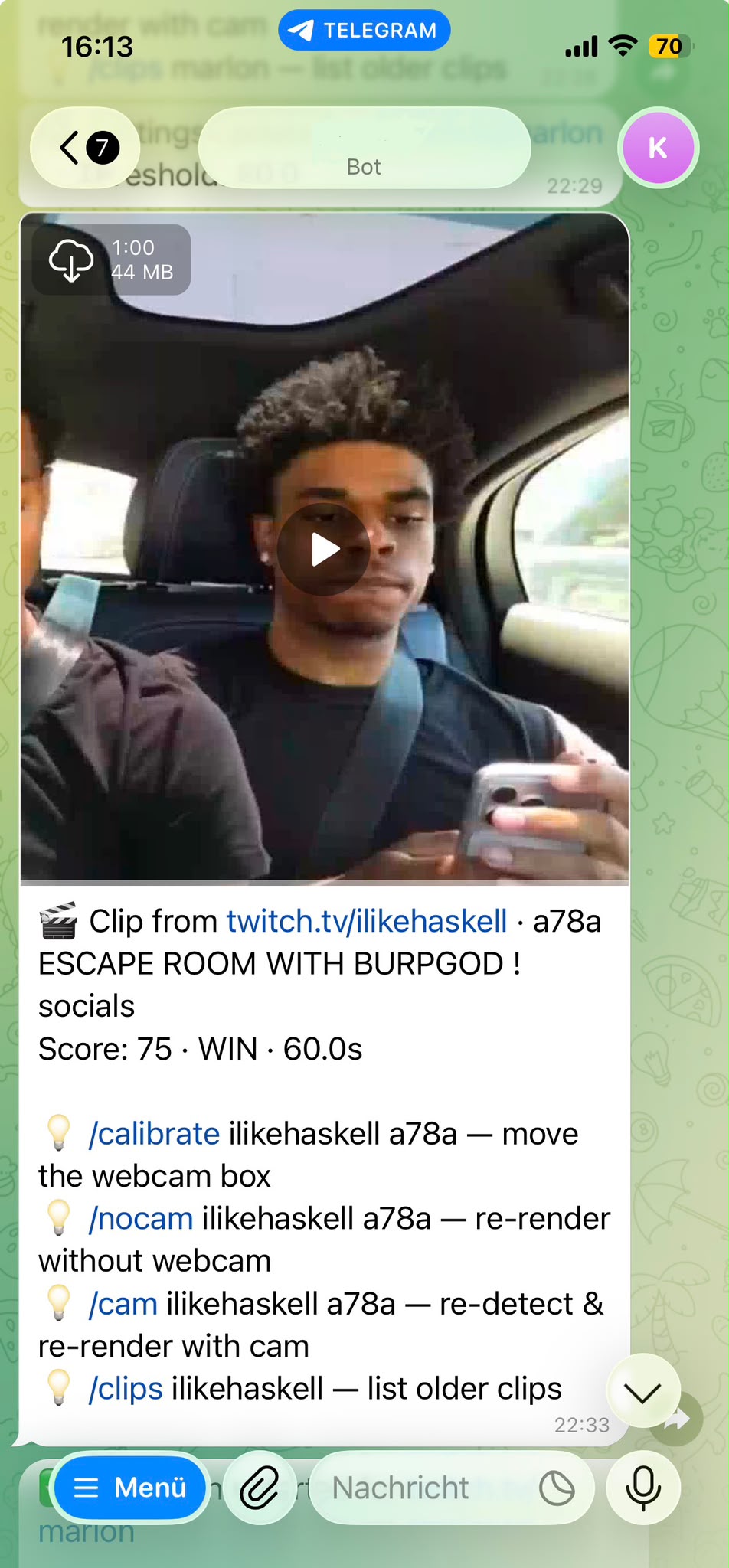
Phone notification showing a klypra clip delivered via Telegram minutes after a chat spike

From chat spike to phone: a fully clipped, captioned highlight in minutes, not hours.

FAQ

Does quso.ai support Twitch livestreams?

Not really. quso.ai’s official help docs list "podcasts, webinars, and YouTube videos" as inputs. There’s a Twitch-branded landing page for SEO, but the product itself works off uploaded files, YouTube links, or Zoom recordings, not a live stream.

Is klypra free?

Yes. klypra doesn't have a paid plan yet. The free tier covers one monitored channel at a time, up to 5 clips a day and 50 a month, with a watermark and no credit card required.

Does klypra work with Kick or Rumble?

Based on klypra's current docs, it's built around Twitch. If you stream primarily on Kick or Rumble, worth double-checking klypra's feature pages directly before switching.

How fast does klypra generate a clip after a chat spike?

klypra posts clips only minutes after the moment happens on stream, since detection and editing both run live instead of after the VOD is uploaded.

Can I use quso.ai alongside klypra?

Sure, they solve different problems. klypra handles live Twitch monitoring and highlight detection; quso.ai is stronger for editing and scheduling podcast or YouTube content across multiple platforms.

Conclusion

quso.ai is a solid tool, just not for the job most Twitch clippers actually need done. It edits recordings well and schedules across more platforms than klypra ever will. But if you're clipping a live stream and speed is what actually earns you views, a tool that reads chat while the moment is happening beats a tool that processes the recording after it's over. klypra fills that specific gap, for free, right now.

next up real-time vs VOD-based Twitch clip generators →

start getting post-ready viral clips.

continue with twitch